Cloudflare’s Auto Minify Deprecation: What You Need to Know
Cloudflare has announced the deprecation of their Auto Minify feature, which previously handled minification at the network layer. This change affects websites that utilized Cloudflare minification vs using their WordPress caching plugin for this purpose including those using Cloudways’ Cloudflare Enterprise option that relied on Cloudflare’s minification capabilities.
For those unfamiliar, minification is a crucial optimization technique that removes unnecessary characters from code without changing its functionality, resulting in faster loading times and improved performance.
Why Use the Breeze Plugin for WordPress Minification?
The Breeze WordPress cache plugin is a lightweight, easy-to-use tool for optimizing website performance. It offers robust features, including minification for CSS, JavaScript, and HTML. By enabling minification in Breeze, you can seamlessly pick up where Cloudflare’s Auto Minify leaves off, ensuring your website’s performance doesn’t take a hit.
Solution: How to Enable WordPress Minification through Breeze
Fortunately, the Breeze WordPress cache plugin, a free and recommended caching solution, includes robust minification capabilities that can effectively replace Cloudflare’s deprecated feature.
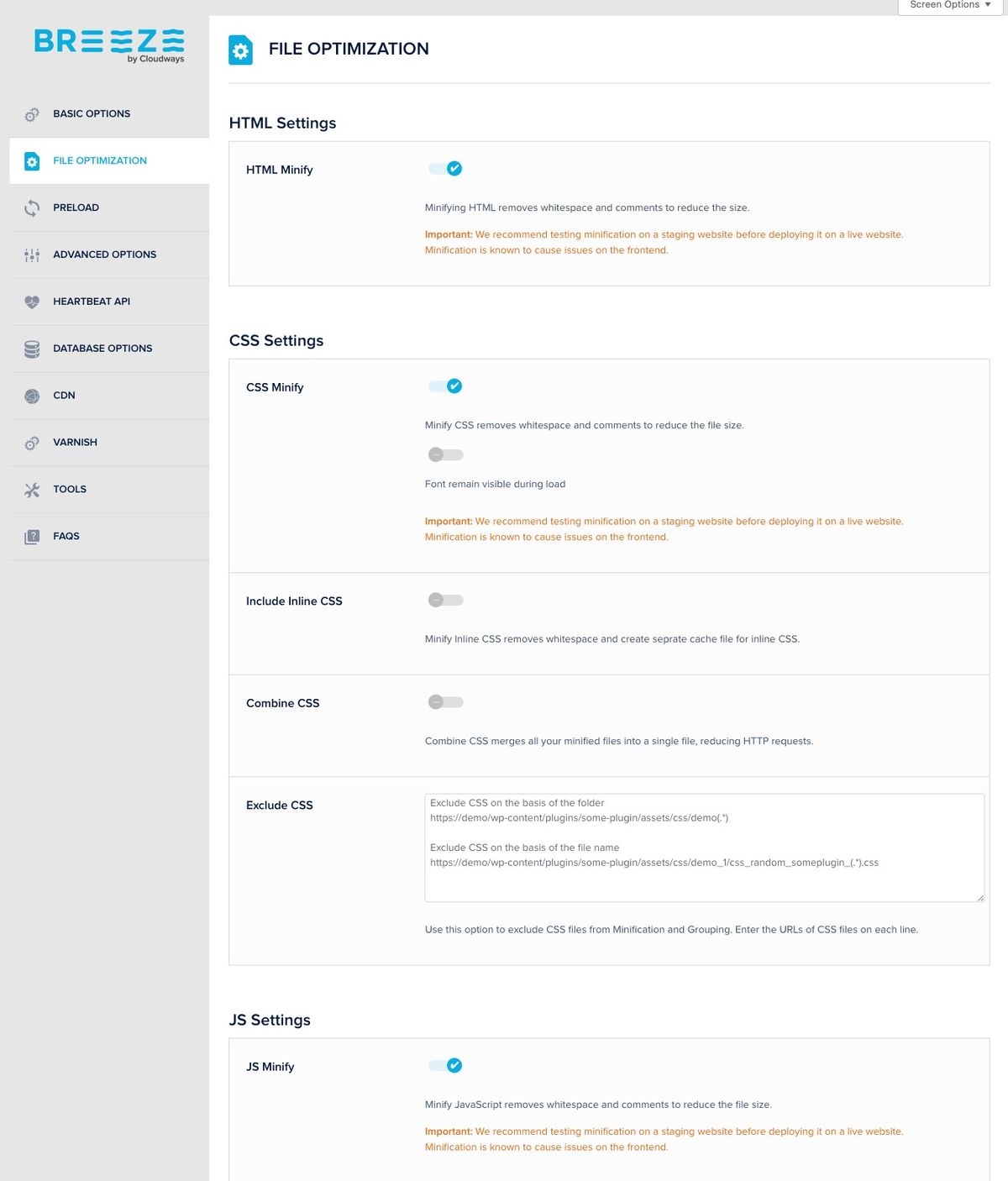
Here’s how to enable minification in Breeze:
- Access your WordPress dashboard
- Navigate to Settings → Breeze
- Click on the “File Optimization” tab
- Enable the following options:
- Minify CSS
- Minify JavaScript
- Group CSS Files
- Group JavaScript Files
- Click “Save Changes”
Be Sure to Test First on a WordPress Staging Site
Before implementing these changes on your live website, we strongly recommend testing them in a staging environment as minification can sometimes conflict with some WordPress themes.
- Create a staging copy of your website through your Cloudways Platform
- Follow the steps above to enable Breeze minification on your staging site
- Test thoroughly for any layout issues or broken functionality including forms
- Use performance testing tools to compare before and after results
- Once satisfied with the results, implement the changes on your production site
Remember to clear your cache and test across different browsers to ensure compatibility. If you encounter any issues during testing, you can easily disable specific minification options in Breeze without affecting other optimization features.
Why This Change Matters for Your WordPress Website
While previously we recommended handling minification at the network layer through Cloudflare, the landscape of web optimization is evolving. Moving minification to the application level through Breeze or your existing caching plugin such as WP Rocket or similar, W3 Total Cache or others offers several advantages:
- More granular control over minification settings
- Better integration with your WordPress environment
- Maintained WordPress performance benefits without relying on third-party services
 Additional Benefits of Using Breeze for WordPress Minification
Switching to Breeze for minification has several advantages:
- Custom Control: Breeze allows you to enable or disable minification for specific file types (CSS, JavaScript, HTML) so you can customize your WordPress optimization strategy.
- Integrated WordPress Caching: Breeze not only handles minification but also provides caching features, which further enhance loading speeds.
- Seamless Integration with Cloudways: Breeze is designed to work seamlessly with Cloudways WordPress hosting, ensuring compatibility and ease of use.
- No Dependency on External Networks: By handling minification at the application level, you reduce reliance on external services and gain greater control over your website’s performance.
What Happens if You Don’t Enable Minification on My WordPress Website?
Without enabling minification, your WordPress website’s performance may be affected. Unminified HTML, CSS, and JavaScript files are typically larger in size, which can contribute to slightly longer load times. While this might have some impact on page speed scores and user experience, it’s just one of many factors that influence overall website performance.
Our Commitment to Your WordPress Site’s Performance
At AlienBoo, we continuously monitor industry changes and provide solutions that maintain your WordPress website’s optimal performance. Our WordPress support team is available to assist AlienBoo clients with implementing these changes or answering any questions you may have.
For detailed instructions on configuring the Breeze WordPress caching plugin, visit Cloudway’s comprehensive guide.